Troubleshooting DIRECTV AEP Remotes for Senior Living and Hospitality Properties
When a TV remote stops working, it can quickly turn into a frustrating situation, especially in a senior living community or hotel setting. For many residents and guests, television is an important source of comfort, entertainment, and connection. So when a DIRECTV remote isn’t working as it should, like not controlling the TV’s power or volume for example, it’s something that needs to be fixed sooner rather than later.
DIRECTV AEP (Advanced Entertainment Platform) remote controls are well-made and dependable, but like any piece of technology, they can sometimes lose their pairing or need to be reprogrammed. In this guide, we’ll walk you through how to program a DIRECTV remote control, explain some of the most common issues, and share simple troubleshooting tips designed with senior living residents and hotel staff in mind.
Understanding Your DIRECTV Equipment
Before troubleshooting, it helps to understand the components involved:
DIRECTV Receiver (AEP Box)
- The receiver is the box that delivers programming to the TV.
- AEP1 may also be referred to as the Technicolor box
- AEP2 is commonly called the DIRECTV box
DIRECTV AEP Remote
- This remote controls both the receiver and the TV once properly programmed.
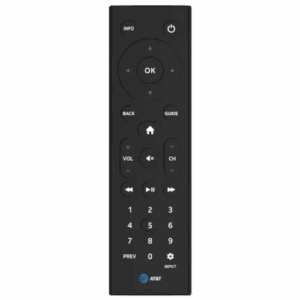
AEP1 Remote Control
The AEP1 remote is designed for DIRECTV’s Advanced Entertainment Platform in hospitality and senior living settings. It offers simple, easy-to-use controls for power, volume, and channel navigation, helping ensure a consistent and guest-friendly TV experience.
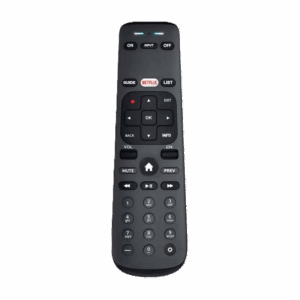
AEP2 Remote Control
The AEP2 remote is used with DIRECTV’s Advanced Entertainment Platform 2 and supports both IR and RF control for added flexibility in hospitality and senior living communities. It allows guests to easily navigate menus and control basic TV functions, even when the set-top box is not in direct line of sight.
Why Your Remote Has Been Unpaired
If your DIRECTV remote suddenly stops controlling the TV’s power or volume, it’s often due to an unpairing issue. Common reasons why a remote control would become unpaired with a receiver include:
-
- Dead Batteries – If no lights flash at the top of the remote when buttons are pressed, replace the batteries with two AAA batteries.
- Low Battery Power – Simply having low-powered batteries in a remote can cause it to have an unstable connection with the receiver and make it not work properly.
- Interference from Other Electronic Devices – Devices including microwaves, baby monitors, and internet routers can mess with the connection between your remote control and receiver. Repositioning them may be necessary for your remote to function.
- Software Updates or System Glitches – To stay up-to-date with security and information needs, software updates for the system are regularly performed. Unfortunately, both regular system updates and unscheduled glitches can unpair your remote.
- Accidental Unpairing – Pressing the wrong set of buttons on the remote can accidentally cause the remote to unpair from the receiver.
How Do I Reset My DIRECTV Remote Control?
If the remote is completely unresponsive, a reset may help:
- Press and hold MUTE + SELECT until the light flashes twice
- Enter 9-8-1
- Press SELECT
After resetting, follow the programming steps below.
How Do I Resync My DIRECTV Remote to My Receiver?
Programming the AEP1 Remote
- Press and hold the OK and MUTE buttons at the same time until the remote’s red light stays on.
- Enter your TV’s 4-digit code assigned to your TV brand (TV brand codes are provided by Groove’s support team or can be found online), then press OK.
- If successful, the TV will turn off. If this happens press OK.
- Turn the TV back on and the remote should be paired.
Programming the AEP2 Remote

- Press and hold the INFO and – (dash) buttons at the same time until both red LEDS at the top of the remote light up and remain on.
- Enter the 4 or 5-digit code assigned to your TV brand. (If an invalid code is entered, the red LEDs will quickly blink twice and then return to setup mode to wait for another code entry attempt.)
- Press OK
- Test VOL and ON/OFF buttons to ensure they work.

“DIRECTV AEP remotes are durable, reliable, and easy to use when properly configured. Most issues can be resolved with quick reprogramming or a reset – and when in doubt, Groove’s support team is always here to help senior living communities and hospitality staff keep residents and guests connected to great entertainment!”
– Angel Villatoro, Technical Support Supervisor at Groove Technology Solutions
Other Common DIRECTV AEP Remote Issues
TV Screen Says “No Signal”
- Confirm the unit TV is on the correct HDMI input for the AEP.
- Verify the TV HDMI cable is plugged into the OUT port on the AEP box.
- Reboot the AEP box by unplugging the power source from the AEP box for 30 seconds, then plugging it back in.
Streaming Apps Not Working
If streaming apps aren’t working on your DIRECTV system, there are typically two main reasons: the internet connection is down or the login information for the streaming service is incorrect.
To check the internet connection status, look at the upper right corner of the DIRECTV home screen for a cloud icon. A cloud with a slash through it means the system is not connected to the internet at all and the issue will need to be resolved by your property’s internet provider. A cloud with an exclamation mark means the system can see the network but cannot access the internet, which is often caused by incorrect or expired network login credentials or a network configuration issue. In this case, contacting your property’s IT team or internet support is the best next step.
The Remote Controls the Channels but Not the Volume
If your DIRECTV remote changes channels but won’t control the volume, it usually means the remote is correctly paired to the DIRECTV receiver (the box) but not programmed to control the TV itself.
Channel and menu buttons communicate directly with the receiver, while volume and power buttons must send infrared signals to the TV, which requires the correct TV brand code. When that TV code is missing, incorrect, or has been reset, the remote can still change channels but won’t adjust sound. The most reliable fix is to reprogram the remote using the steps outlined above so it can control both the receiver and the TV’s volume as intended.

Need Help Programming Your DIRECTV Remote?
Whether you’re a resident in a senior living community or part of a hotel or hospitality team, help is always available. If you need assistance with programming a remote, finding correct TV codes, or troubleshooting problems, the Groove support team is ready to provide expert guidance and quick solutions. We are a DIRECTV Authorized Dealer and have worked with their systems for many years. Contact us online or by phone today!